- Rust 100%
| Filename | Latest commit message | Latest commit date |
|---|---|---|
 edae8e9724
Some checks failed
Linters / Run rustfmt on the minimum supported toolchain (push) Has been cancelled
Linters / Run clippy on the minimum supported toolchain (push) Has been cancelled
Tests / Test the minimum supported toolchain (push) Has been cancelled
Tests / Test on latest stable (push) Has been cancelled
Tests / Test on nightly (push) Has been cancelled
Tests / Test on Windows (push) Has been cancelled
fix: prevent mocks from matching after exceeded expect_at_most |
||
| .cargo | ||
| .github | ||
| benches | ||
| docs | ||
| examples | ||
| src | ||
| tests | ||
| .gitignore | ||
| benchmarks.txt | ||
| Cargo.toml | ||
| LICENSE | ||
| README.md | ||
| rustfmt.toml | ||






HTTP mocking for Rust!
Mockito is a library for generating and delivering HTTP mocks in Rust. You can use it for integration testing or offline work. Mockito runs a local pool of HTTP servers which create, deliver and remove the mocks.
Features
- Supports HTTP1/2
- Runs your tests in parallel
- Comes with a wide range of request matchers (Regex, JSON, query parameters etc.)
- Checks that a mock was called (spy)
- Mocks multiple hosts at the same time
- Exposes sync and async interfaces
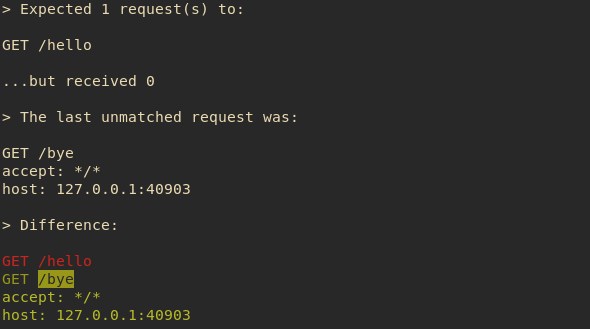
- Prints out a colored diff of the last unmatched request in case of errors
- Simple, intuitive API
- An awesome logo
The full documentation is available at https://docs.rs/mockito.
Before upgrading, make sure to check out the changelog.
Getting Started
Add mockito to your Cargo.toml and start mocking:
#[test]
fn test_something() {
    // Request a new server from the pool
    let mut server = mockito::Server::new();

    // Use one of these addresses to configure your client
    let host = server.host_with_port();
    let url = server.url();

    // Create a mock
    let mock = server.mock("GET", "/hello")
      .with_status(201)
      .with_header("content-type", "text/plain")
      .with_header("x-api-key", "1234")
      .with_body("world")
      .create();

    // Any calls to GET /hello beyond this line will respond with 201, the
    // `content-type: text/plain` header and the body "world".

    // You can use `Mock::assert` to verify that your mock was called
    mock.assert();
}
If Mock::assert fails, a colored diff of the last unmatched request is displayed:
Use matchers to handle requests to the same endpoint in a different way:
#[test]
fn test_something() {
    let mut server = mockito::Server::new();

    server.mock("GET", "/greetings")
      .match_header("content-type", "application/json")
      .match_body(mockito::Matcher::PartialJsonString(
          "{\"greeting\": \"hello\"}".to_string(),
      ))
      .with_body("hello json")
      .create();

    server.mock("GET", "/greetings")
      .match_header("content-type", "application/text")
      .match_body(mockito::Matcher::Regex("greeting=hello".to_string()))
      .with_body("hello text")
      .create();
}
Start multiple servers to simulate requests to different hosts:
#[test]
fn test_something() {
    let mut twitter = mockito::Server::new();
    let mut github = mockito::Server::new();

    // These mocks will be available at `twitter.url()`
    let twitter_mock = twitter.mock("GET", "/api").create();

    // These mocks will be available at `github.url()`
    let github_mock = github.mock("GET", "/api").create();
}
Write async tests (make sure to use the _async methods!):
#[tokio::test]
async fn test_simple_route_mock_async() {
    let mut server = Server::new_async().await;
    let m1 = server.mock("GET", "/a").with_body("aaa").create_async().await;
    let m2 = server.mock("GET", "/b").with_body("bbb").create_async().await;

    let (m1, m2) = futures::join!(m1, m2);

    // You can use `Mock::assert_async` to verify that your mock was called
    // m1.assert_async().await;
    // m2.assert_async().await;
}
Start a stand-alone server on a dedicated port:
fn main() {
    let opts = mockito::ServerOpts {
        host: "0.0.0.0",
        port: 1234,
        ..Default::default()
    };
    let mut server = mockito::Server::new_with_opts(opts);

    let _m = server.mock("GET", "/").with_body("hello world").create();

    loop {}
}
Minimum supported Rust toolchain
The current minimum support Rust toolchain is 1.85.0
Contribution Guidelines
- Check the existing issues and pull requests.
- One commit is one feature - consider squashing.
- Format code with
cargo fmt. - :shipit:
Development
Tests
Run tests:
cargo test
...or run tests using a different toolchain:
rustup run --install 1.85.0 cargo test
...or run tests while disabling the default features (e.g. the colors):
cargo test --no-default-features
Code style
Mockito uses rustfmt as a general code style.
Install rustfmt:
rustup component add rustfmt
Format code:
cargo fmt
Some editors might provide a plugin to format your Rust code automatically.
Linter
Mockito uses clippy and it should be run always on the minimum supported Rust version, in order to ensure backwards compatibility.
Install clippy:
rustup component add clippy
The linter is always run on the minimum supported Rust version:
rustup run --install 1.70.0 cargo clippy-mockito
Release
Release:
cargo publish
Benchmarks
Install rust nightly:
rustup install nightly
Run benchmarks:
rustup run nightly cargo bench